I was recently asked by a colleague who upgraded an Edge server from Lync Server 2010 to 2013 similar to the way I outlined here:
Upgrading Edge server from Lync Server 2010 to Lync Server 2013
http://terenceluk.blogspot.com/2013/01/upgrading-edge-server-from-lync-server.html
The upgrade went well but he noticed that depending on where he set the Next hop pool:
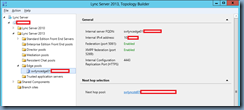
… users’ federation contacts in the other pool wouldn’t work. To clarify what I mean, if he were to set the Next hop pool to the Lync Server 2013 pool, users on the Lync Server 2010 pool’s federated contacts would be shown as Presence Unknown and while their federated contacts can initiate messages to them, they cannot. They also noticed that messages begin to work once the communication has started (their federated contact messages them). This becomes the same for the Lync Server 2013 users when the Next hop pool is set to Lync Server 2010. I originally did not have much time to look at this for him so he I let him use my account to post a question on the partner forums but after not getting anywhere with the response he received, I had a look at it and noticed that he forgotten to check the Enable SIP federation checkbox for the Site settings:
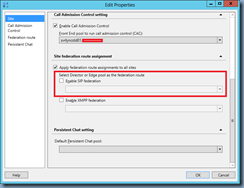
This is actually similar to another issue I blogged about in the past even though not exactly the same:
Federation no longer works after moving user to new Lync Server 2013 pool to Lync Server 2010 during coexistence
http://terenceluk.blogspot.com/2012/11/federation-no-longer-works-after-moving.html
Once the Enable SIP federation checkbox was checked:
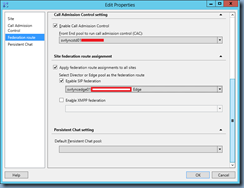
… federated contacts worked properly for all users regardless of whether the Next hop pool was configured to point to the Lync Server 2010 or 2013 pool.