I’ve recently been working with an organization going through a transition to new ownership and one of the changes taking place is that the company will inherit users from a remote office that is currently owned by the company that is selling them off. I always struggle to phrase the scenario properly so let me use the following itemized points to describe the environment:
- Company A’s Active Directory is comprised of 1 domain in 1 forest named newDomain.internal
- Company B’s Active Directory is comprised of 1 domain in 1 forest named oldDomain.internal
- Company B has 20 users who will be moving to Company A’s domain
- An administrator from Company B will export the 20 users Exchange mailbox to PST and deliver it to Company A
- Company A will create new AD and Exchange mailboxes for these 20 users and import the PSTs
I am working for Company A and my task is to ensure that when these 20 users can open up their Outlook and click the Reply button to an old email containing one or more of the 19 users moved over to Company A. As most administrators may know Exchange uses X.500 addresses for e-mail sent to addresses within the Exchange organization so when users open up the old emails with the migrated users’ email addresses, these addresses are not stored in SMTP format but rather X.500 format that looks something similar to the following:
/o=newDomain/ou=Exchange Administrative Group (FYDIBOHF23SPDLT)/cn=Recipients/cn=Luk, Terence
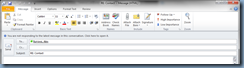
Attempting to reply to these old emails will show the following in Outlook:
This e-mail message cannot be delivered to UserName X because the e-mail address is no longer valid.
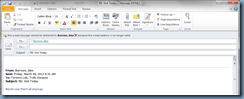
If you proceed to reply to these emails within the new domain, you will receive a bounce back because you’re asking Exchange to route an email with a X.500 address that is foreign to the new newDomain.internal organization. In order to address the issue for replying to these emails when the migrated oldDomain.internal users attempt to reply to an old email that was imported from the PST export of their oldDomain.internal mailbox, we can configure an x500 proxy address for the users. The X.500 proxy address we’ll need can be retrieved from the user’s legacyExchangeDN value in the oldDomain.internal domain and can be retrieved with the following 3 methods:
ADSIedit Console
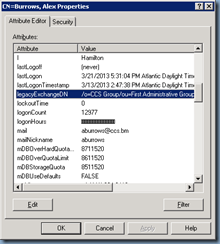
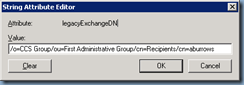
You can retrieve the user’s legacyExchangeDN attribute by using the adsiedit.msc console and viewing the user object’s properties as shown in the following screenshot:
Exchange PowerShell Cmdlet
If the mailbox is in an Exchange 2007 or 2010 organization, you can use the following cmdlet to retrieve the value of the attribute:
Get-Mailbox "Mailbox Name" | Format-List LegacyExchangeDN
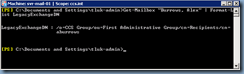
Outlook Contact Properties
If you do not have access to the old domain or the administrator there would not give you the legacyExchangeDN attribute value then you can wait till you get the exported PSTs, import them, and use Outlook to retrieve the attribute value:
Open the user’s Outlook Properties from within Outlook:
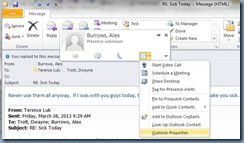
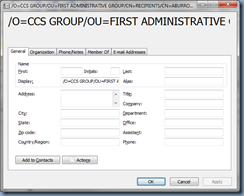
--------------------------------------------------------------------------------------------------------------------------------------------------------------------
With the attribute retrieved, we can then proceed to use the Exchange Management Console to add a X.500 address to the users’ properties:
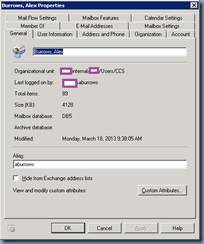
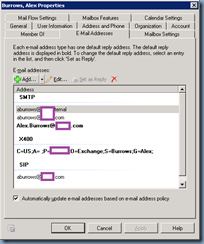
From within the E-Mail Addresses tab, click on the Add button then Custom Address…:
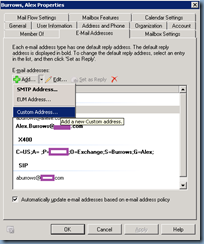
![clip_image001[4]](http://lh4.ggpht.com/-q_zPTR5__BM/UUw99gcp5CI/AAAAAAAAbjU/ccX4WZTQpRQ/clip_image001%25255B4%25255D_thumb.png?imgmax=800 "clip_image001[4]")
From within the Custom Address window, enter the legacyExchangeDN attribute into the E-mail address field and X500 into the E-mail type field:
![clip_image001[6]](http://lh4.ggpht.com/-Bo_PoVA3lwY/UUw9-tjN-YI/AAAAAAAAbjk/LVNm6YMycDg/clip_image001%25255B6%25255D_thumb.png?imgmax=800 "clip_image001[6]")
A new address should now be displayed:
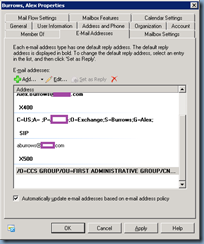
Note that Outlook will need to be restarted if it was opened before the X.500 address was entered:

Once Outlook is restarted, you should now be able to reply to the old email: