Problem
You have an existing vCenter deployed in your environment and you would like to deploy a second node in LinkedMode so you proceed with the install of SSO on the second node:
![clip_image002[4]](http://lh3.ggpht.com/-FE0oE_xtzYU/USlWIv9fzzI/AAAAAAAAY5Y/49VgMOOS1Pw/clip_image002%25255B4%25255D_thumb.jpg?imgmax=800 "clip_image002[4]")
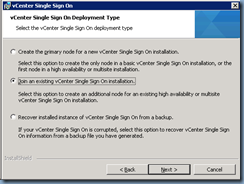
Select Join an existing vCenter Single Sign-Oninstallation:
Select Multisite:
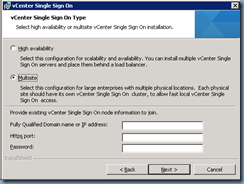
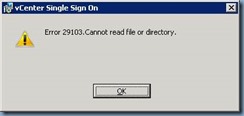
… and proceed with filling in the fields to install but receive the following error:
Error 29103. Cannot read file or directory.
Solution
The reason why I was receiving this error was because my colleague who deployed the first node used the Simple install option:
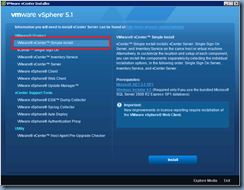
… which does not support multisite as discussed in the following forum thread:
http://communities.vmware.com/message/2154989
The solution? Uninstall everything in reverse order for the first node and reinstall using the appropriate multisite settings:
![clip_image002[8]](http://lh5.ggpht.com/-YXSzpwhpDBU/USlWPKBfZOI/AAAAAAAAY6o/m0wDlMk8TY8/clip_image002%25255B8%25255D_thumb.jpg?imgmax=800 "clip_image002[8]")
![clip_image002[10]](http://lh5.ggpht.com/-rLEWJ4cQbpM/USlWQN_bB7I/AAAAAAAAY64/D4O3Chn1OsY/clip_image002%25255B10%25255D_thumb.jpg?imgmax=800 "clip_image002[10]")
![clip_image002[12]](http://lh3.ggpht.com/-va5HS8cOEoo/USlWRcj8RaI/AAAAAAAAY7I/Lg5hanqcMQ0/clip_image002%25255B12%25255D_thumb.jpg?imgmax=800 "clip_image002[12]")
I went ahead and uninstalled and reinstalled the whole environment over the weekend to get Linked Mode up. Situations like these is why I prefer to do everything myself.