I’ve recently been asked to look at an issue where a previous install of Microsoft Office 2013 with customizations such as the following were made:
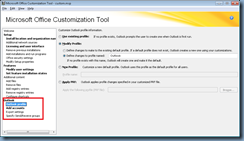
… but a decision was made afterwards that these should be removed so the administrator would uninstall the installation, modify the MSP file, reinstall but noticed that Outlook would continue to automatically create a profile as defined in the previous installation.
The reason for this behavior is actually quite simple and that’s because OCT actually creates a custom15.prf (or 14 for Office 2010) within the Microsoft Office directory which contains the customizations for the Outlook profile creation:
32-Bit Office: C:\Program Files (x86)\Microsoft Office
64-Bit Office: C:\Program Files\Microsoft Office
File name: custom15.prf
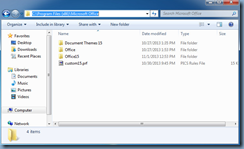
The PRF file is actually a simple text file that you can open with Notepad to browse the customizations as shown in the following screenshot:
![clip_image001[4]](http://lh3.ggpht.com/-TOfylumw9Kc/UtXf07oqgUI/AAAAAAAAguw/0hbPPne2gQI/clip_image0014_thumb1.png?imgmax=800 "clip_image001[4]")
![clip_image001[6]](http://lh3.ggpht.com/-93Jy7MwL1lA/UtXf2tbb_JI/AAAAAAAAgvA/I__LK88U1zY/clip_image0016_thumb1.png?imgmax=800 "clip_image001[6]")
![clip_image001[8]](http://lh3.ggpht.com/-y7cJi8FHvFY/UtXf4vxXdoI/AAAAAAAAgvQ/RUxyBGaIVUI/clip_image0018_thumb1.png?imgmax=800 "clip_image001[8]")
As most would have probably guessed, the way around this is to either delete the whole directly after Office has been uninstalled or simply delete the PRF file.