A colleague recently called me when one of his clients had an Exchange 2010 server fail and because I’ve done this in the past and blogged about it, I pointed him to one of my previous posts here:
Recovering an Exchange 2010 Mailbox Server from a corrupted operating system
http://terenceluk.blogspot.com/2011/08/recovering-exchange-2010-mailbox-server.html
However, while recovering a failed Exchange 2010 server with the setup.exe /m:recoverserver switch he received the following error:
D:\>setup /m:recoverserver
Welcome to Microsoft Exchange Server 2010 Unattended Setup
Setup will continue momentarily, unless you press any key and cancel the
installation. By continuing the installation process, you agree to the license
terms of Microsoft Exchange Server 2010.
If you don't accept these license terms, please cancel the installation. To
review the license terms, please go to
http://go.microsoft.com/fwlink/?LinkId=150127&clcid=0x409/
Press any key to cancel setup................
No key presses were detected. Setup will continue.
Preparing Exchange Setup
Copying Setup Files COMPLETED
The following server roles will be recovered
Languages
Mailbox Role
Management Tools
Performing Microsoft Exchange Server Prerequisite Check
Configuring Prerequisites COMPLETED
Language Pack Checks COMPLETED
Mailbox Role Checks FAILED
Exchange Server 2010 build 14.2.247.5 or later must be used to perform a re
covery of this server.
The Exchange Server setup operation didn't complete. More details can be found
in ExchangeSetup.log located in the <SystemDrive>:\ExchangeSetupLogs folder.
Exchange Server setup encountered an error.
D:\>
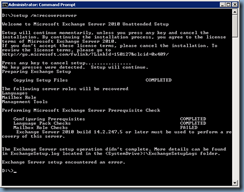
One of the items I forgot to mention in my blog post which was also brought up by one of the visitors in the comments is that you need to use installation binaries that are at the same service pack level as the server you are recovering. In my previous blog post, it was SP1 but for the server my colleague was recovering, it was SP2. As most would know, there is no Exchange Server 2010 with SP2 ISOs for download on the Microsoft site and for some odd reason, I haven’t come across any documentation from Microsoft or the TechNet article:
Recover a Database Availability Group Member Server
http://technet.microsoft.com/en-us/library/dd638206(v=exchg.141).aspx
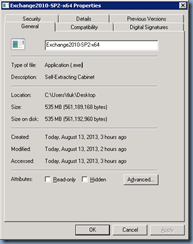
… stating that you can actually download Exchange Server 2010 SP2, extract it and use it as installation binaries. So if you are to receive this error, simply download the 535MB Exchange2010-SP2-x64.exe file:
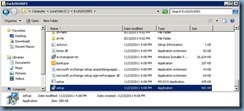
… extract it into a folder:
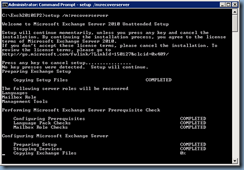
… then run setup.exe /m:recoverserver to perform the install:
![clip_image002[4]](http://lh6.ggpht.com/-J_kKu3lqK5U/UgrQHnolgnI/AAAAAAAAdfI/FW58BdM2Jz4/clip_image002%25255B4%25255D_thumb.jpg?imgmax=800 "clip_image002[4]")